
Auf dieser Seite wird beschrieben, welche Richtlinien für die Rezertifizierung zu beachten sind. Durch Befolgen dieser empfohlenen Vorgehensweisen kann die Wirkung der Rezertifizierung maximiert und sichergestellt werden, dass die Mitarbeiter das vorgeschriebene Training absolvieren.
Die folgenden Best Practices können je nach Szenario angewendet werden:
Ausschluss von Nutzern aus dem Rezertifizierungsprozess
Ein Mitarbeiter in der Zielgruppe muss diese Rezertifizierung aus bestimmten Gründen nicht absolvieren. Was ist zu tun? Es ist nicht möglich, den Benutzer aus der Zielgruppe zu entfernen, da die Zielgruppe auch für andere Zwecke verwendet werden kann. Um einen Benutzer aus der Rezertifizierung zu entfernen, kann dies über die Registerkarte „Direktzuweisung” in der Teilnehmerverwaltung der Kursvorlagen erfolgen.
Unter der Registerkarte „Direktzuweisung“ können explizit Nutzer hinzugefügt werden, die nicht in den Rezertifizierungsprozess einbezogen werden sollen. Andererseits können auch Nutzer, die nicht zur Zielgruppe gehören, in den Prozess integriert werden.
Einschließlich Nutzer, die einen Kurs bereits ohne Rezertifizierung erfolgreich beendet haben
Benutzer, die in der Vergangenheit einen Kurs absolviert haben, für die zu diesem Zeitpunkt jedoch keine Rezertifizierung konfiguriert und keine automatische Buchung auf Kursniveau eingerichtet war, werden, wenn sie später Teil einer Zielgruppe werden, für die eine Rezertifizierung konfiguriert ist, als neue Nutzer behandelt, die gerade mit dem Rezertifizierungsprozess beginnen.
Behandlung von Teilnehmern, die nach dem Fälligkeitsdatum den Status „gebucht“ oder „In Bearbeitung“ haben
Nicht alle Nutzer beenden einen Kurs bis zum vorgegebenen Fälligkeitsdatum erfolgreich. Bisher wurden nur Nutzer, die einen Kurs erfolgreich abgeschlossen hatten, für den nächsten Zertifizierungszeitraum berücksichtigt. Um auch Lernenden mit dem Status „Gebucht” und „In Bearbeitung” die Fortsetzung mit einem nächsten Kurs zu ermöglichen, kann die Einstellung „Status nach einer definierten Anzahl von Tagen ändern” im Abschnitt „Einstellungen für die Rezertifizierung” verwendet werden.
Wenn diese Einstellung ausgewählt ist, wird das Textfeld aktiviert, in dem die Tage angegeben werden können, nach denen die Statusänderung nach dem Fälligkeitsdatum erfolgen soll. Hier kann eine dreistellige Nummer eingegeben werden, die die Anzahl der Tage nach dem Fälligkeitsdatum angibt, an denen die Statusänderung ausgeführt wird.
Nutzer können die festgelegte Anzahl zusätzlicher Tage überziehen, bevor sich der Status wie definiert ändert. Bei Eingabe von „0“ sind keine zusätzlichen Tage zulässig und der Status ändert sich direkt am Tag nach dem Fälligkeitsdatum.
Es ist möglich, einen Status auszuwählen, in den der Nutzerstatus geändert werden soll. Folgende Optionen stehen zur Verfügung:
-
Abgesagt
-
Bestanden
-
Nicht bestanden
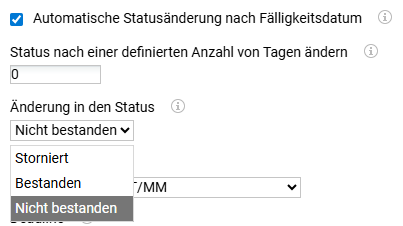
Die Statusänderung wird durchgeführt durch die Teilnehmer Automatische Statusänderung Job die täglich einer Zeitplanung unterzogen werden muss.
(de.imc.clix.comp.edu.type.participant.TeilnehmerAutomatischeStatusänderung).
In Kombination mit der Einstellung „Abgemeldete und nicht erfolgreiche Nutzer erneut anmelden“ werden diese Lernenden für den Rezertifizierungszyklus berücksichtigt. Wenn diese Einstellung nicht aktiv ist, werden diese Lernenden nicht in zukünftige Zyklen einbezogen.
Umgang mit Teilnehmern, die den Kurs nicht bestanden haben oder deren Status abgesagt wurde (auch bei mehrfachen Stornierungen)
Die Option „Abgesagte und nicht erfolgreiche Nutzer erneut registrieren“ ermöglicht es, abgesagte und nicht erfolgreiche Teilnehmer für den nächsten verfügbaren Kurs zu registrieren und den Rezertifizierungsprozess fortzusetzen. Auch Teilnehmer, die mehrfach abgesagt wurden, werden berücksichtigt. Diese Option kann nur ausgewählt werden, wenn „Rezertifizierung“ ausgewählt ist.
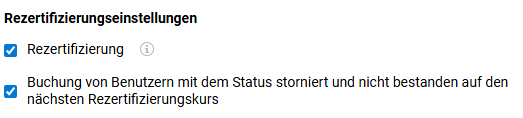
Wenn „Abgemeldete und durchgefallene Benutzer erneut anmelden“ deaktiviert ist, werden Nutzer mit dem Status „Nicht bestanden“ oder „Abgesagt“ nicht für weitere Buchungen berücksichtigt und behalten denselben Status (Lernvorgabe, Nicht bestanden) und (Lernvorgabe, Abgesagt) auf Kursvorlagen- und Kursniveau mit demselben Fälligkeitsdatum.
Wenn „Abgesagte und nicht erfolgreiche Nutzer erneut registrieren“ aktiviert ist und der Auftrag ausgeführt wird
-
Wenn ein Kurs nicht verfügbar ist, bleiben die Nutzer auf (Lernvorgabe, Nicht bestanden) und (Lernvorgabe, Abgesagt) auf der Kursvorlage und dem Kursniveau mit demselben Fälligkeitsdatum.
-
Wenn ein Kurs verfügbar ist, wird der Nutzer direkt mit dem Status „Gebucht/Gebucht“ auf Kursvorlagen-/Kursniveau Gebucht, wobei das Fälligkeitsdatum wie folgt berechnet wird:
-
Wenn der Nutzer noch nie einen Kurs erfolgreich beendet hat, wird die Berechung des initialen Fälligkeitsdatums angewendet.
-
Wenn der Nutzer einen Kurs erfolgreich beendet hat, wird das Fälligkeitsdatum als das spätere der beiden folgenden Daten berechnet: (Anmeldedatum + Tage zum Beenden) und Fälligkeitsdatum des letzten Kurses.
-
Das Verhalten bleibt unverändert, unabhängig davon, ob der Nutzer der Gruppe wieder beigetreten ist oder nicht.
Beispiel:
Der Nutzer hat den Kurs Ende 2024 erfolgreich beendet, wodurch die Gültigkeit des Zertifikats für 12 Monate festgelegt wurde, die Ende Dezember 2025 abläuft. Der Nutzer wurde im Februar 2025 für die Rezertifizierung registriert, mit dem Ziel, einen neuen Kurs vor Dezember 2025 abzuschließen. Allerdings hat der Nutzer den Kurs im Juni 2025 nicht bestanden.
Da die Zertifizierung auf dem letzten erfolgreichen Abschluss basiert und die Dauer ein Jahr ab Dezember 2024 beträgt, führt das Nichtbestehen eines Rezertifizierungsversuchs vor Ablauf dieser Frist nicht zur Ungültigkeit der aktuellen Zertifizierung.
Das ursprüngliche Zertifikat bleibt bis Dezember 2025 gültig, es sei denn, es gibt eine spezielle Richtlinie, die besagt, dass das Nichtbestehen eines vorzeitigen Versuchs sofort zum Entzug der Zertifizierung führt, was jedoch selten der Fall ist. Daher bleibt die Zertifizierung des Nutzers bis zum ursprünglichen Ablaufdatum bestehen, und der Nutzer bleibt trotz des Nichtbestehens des Rezertifizierungskurses im Juni 2025 bis Dezember 2025 zertifiziert.
Umgang mit neuen Mitarbeitern
Nutzer, die ein Rezertifizierungstraining absolvieren müssen, könnten aus verschiedenen Gründen von ihrer Zuweisung zum Rezertifizierungstraining zurücktreten, z. B. aufgrund eines Arbeitsplatz-/Stellenwechsels, Elternzeit oder einer langfristigen Erkrankung.
Die systemische Behandlung dieser Fälle unterscheidet sich je nach dem Status quo, den der Nutzer zum Zeitpunkt seines Austritts aus der Gruppe hatte. Dabei ist zu unterscheiden zwischen:
-
ob ein Nutzer, der aus der Gruppe austritt, vor seinem Austritt einen Kurs der Kursvorlage erfolgreich beendet hat oder nicht, und
-
ob die Einstellung „Automatische Stornierung“ aktiviert wurde oder nicht
Neue Mitarbeiter, die nicht mindestens einen Kurs der Kursvorlage erfolgreich beendet haben
Nutzer, die einen Kurs der Kursvorlage nicht erfolgreich beendet haben, werden in Abhängigkeit von ihrem Benutzerstatus und davon behandelt, ob die Checkbox für die automatische Stornierung für ihre Gruppe aktiviert ist oder nicht.
In jedem Fall wird der Nutzer aus dem Tab der Lernvorgabe der Kursvorlage entfernt, wenn er nicht mehr Mitglied der Gruppe ist.
Wenn die Checkbox „Automatische Abmeldung“ aktiviert ist, wird der Nutzer aus einem laufenden Kurs abgemeldet. Wenn ein solcher Nutzer der Gruppe erneut beitritt, werden diese Nutzer wie ursprünglich zugewiesene Mitglieder der Gruppe behandelt. Das bedeutet, dass alle Einstellungen im Abschnitt „Buchungseinstellungen“ im Dialog der Zuweisung angewendet werden und der Nutzer direkt angemeldet wird und ein neu berechnetes ursprüngliches Fälligkeitsdatum erhält. Die Einstellung „Neu hinzugefügte Mitglieder berücksichtigen“ hat keine Auswirkungen auf die neuen Mitarbeiter.
Wenn die Checkbox nicht aktiviert wurde, bleibt der Nutzer für einen laufenden Kurs angemeldet. Nach dem Erfolgreichen Beenden des Kurses wird das nächste Fälligkeitsdatum für den zweiten Kurs auf der Grundlage der definierten Rezertifizierungseinstellungen berechnet und die Buchung durchgeführt.
Neue Mitarbeiter, die bereits mindestens einen Kurs der Kursvorlage erfolgreich beendet haben
Benutzer, die einen Kurs der Kursvorlage erfolgreich abgeschlossen haben, werden weiterhin auf der Registerkarte „Persönliche Lernvorgabe“ der Kursvorlage aufgeführt, aber die Rezertifizierung und die Automatische Buchung sind für sie auf „Nein“ gesetzt. Ein nächstes Fälligkeitsdatum wird nicht angezeigt, aber das System speichert es dauerhaft, um es wiederherzustellen, wenn der Benutzer der Gruppe erneut beitritt.
Wenn die Checkbox „Automatische Abmeldung“ für ihre Gruppe aktiviert ist, werden sie aus allen aktuellen Kursen abgemeldet, in denen sie zum Zeitpunkt ihres Austritts aus der Gruppe Gebucht sind. Der Einschreibungsstatus bleibt davon unberührt.
Wenn diese Nutzer wieder der Gruppe beitreten, wird der persönliche Status der Lernvorgabe für den Nutzer auf der Grundlage des wiederhergestellten nächsten Fälligkeitsdatums aktualisiert, wie es vor dem Ausscheiden der Fall war. Weitere Maßnahmen hängen davon ab, ob die Buchung, berechnet anhand des nächsten Fälligkeitsdatums – Tage zum Beenden – Puffer-Tage, <= heute ist.
Ist dies nicht der Fall, bleibt der Status des Nutzers „Erfolgreich abgeschlossen“ und die nächste Fälligkeit wird erneut angezeigt. Andernfalls ändert sich der Status „Teilnehmerstatus (Vorlage)“ in „Lernvorgabe“. Im letzteren Fall überprüft das System anschließend, ob ein Kurs verfügbar ist. Ist dies der Fall, wird der Nutzer unter Berücksichtigung des Ansatzes „späteres Datum gilt“ direkt für diesen Kurs angemeldet, wie in der folgenden Abbildung dargestellt.
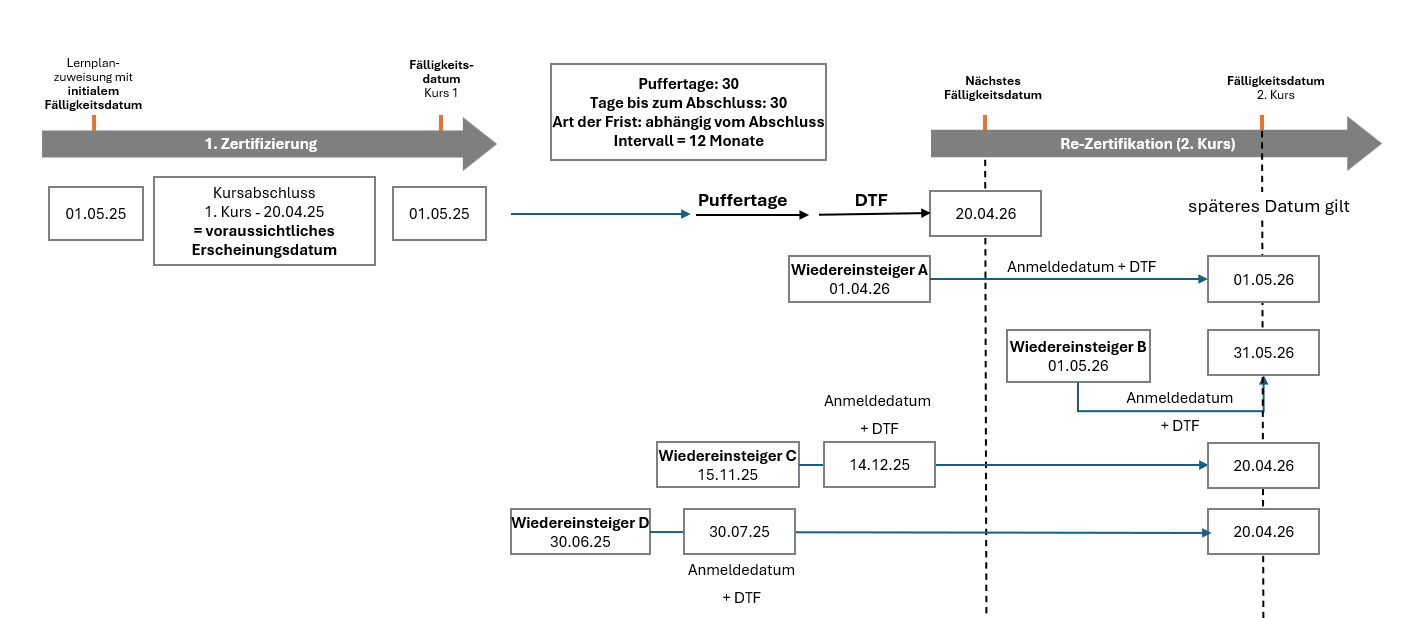
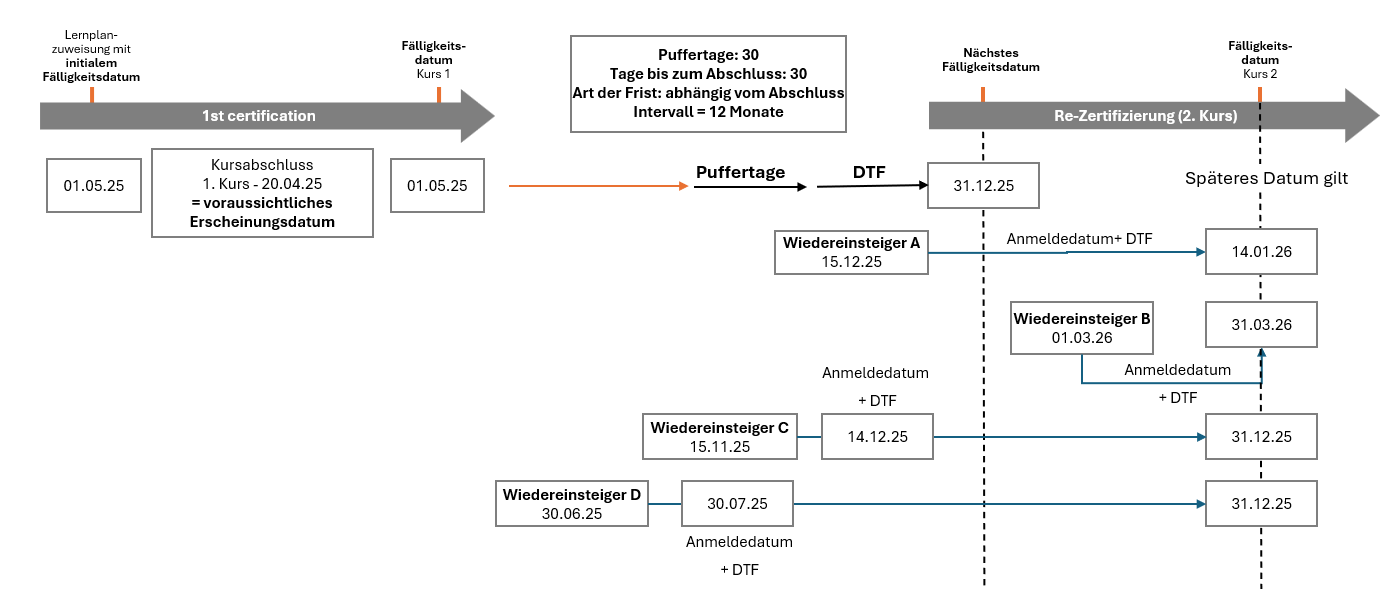
Das System vergleicht, wie bei jeder anderen im Rahmen der Rezertifizierung durchgeführten Buchung, das festgelegte nächste Fälligkeitsdatum mit dem Datum, das sich aus dem Anmeldedatum plus den Tagen zum Beenden ergibt, und anwendet das spätere der beiden Daten als Fälligkeitsdatum für den Kurs, für den der Nutzer angemeldet ist.
In den dargestellten Beispielen bedeutet dies, dass für beide Einsendeschlüsse, „basierend auf Abschluss“ und „TT/MM“, Folgendes angewendet wird:
-
Wiederbeitretende Mitglieder, die an einem Datum, das weniger als die festgelegten Tage zum Beenden der Wiederherstellung vom wiederhergestellten nächsten Fälligkeitsdatum entfernt ist, wieder Mitglied der Gruppe werden, erhalten ein Fälligkeitsdatum, das anhand des Anmeldedatums zuzüglich der Tage zum Beenden berechnet wird, da dieses Fälligkeitsdatum später als das wiederhergestellte nächste Fälligkeitsdatum liegt. (Wiederbeitretendes Mitglied A)
-
Wiederbeitretende Mitglieder, die nach dem wiederhergestellten nächsten Fälligkeitsdatum erneut Mitglied der Gruppe werden, erhalten ein Fälligkeitsdatum, das anhand des Anmeldedatums zuzüglich der Tage zum Beenden berechnet wird, da das nächste Fälligkeitsdatum in der Vergangenheit liegt. (Wiederbeitretendes Mitglied B)
-
Neue Mitarbeiter, die zu einem Zeitpunkt wieder in die Gruppe aufgenommen werden, der mehr als die festgelegten Tage zum Beenden der Wiederherstellungsfrist vom nächsten Fälligkeitsdatum entfernt ist, erhalten das nächste Fälligkeitsdatum als ihr Fälligkeitsdatum, da dieses Datum immer später ist als das Datum, das sich aus dem Datum der Buchung plus den Tagen zum Beenden der Wiederherstellungsfrist für solche Fälle ergibt. Dabei spielt es keine Rolle, ob der Nutzer innerhalb des Zeitraums, in dem Puffer-Tage angewendet werden (Wiedereintrittsfall C), oder sogar davor (Wiedereintrittsfall D) wieder beitritt.
Rezertifizierung in Kombination mit der Anwendung von Skills
Ein beliebter Anwendungsfall ist die Einbeziehung von Skills in den Rezertifizierungsprozess. Skills oder deren Fehlen werden als Kriterien für die Bildung von Zielgruppen herangezogen.
Skills können im Allgemeinen wie gewohnt verwendet werden, d. h. sie werden einer Kursvorlage oder einem Kurs zugewiesen, haben Leistungsauslöser mit Kursabschluss und ein Verfallsdatum für die Fähigkeit. Diese Fähigkeitsleistung sollte jedoch nicht für die Einbeziehung oder den Ausschluss bei der Zielgruppenzusammenstellung verwendet werden, die für Rezertifizierungszwecke dient. Andernfalls könnten Nutzer nach dem Erreichen der Fähigkeit unbeabsichtigt aus der Zielgruppe ausscheiden und erst am Verfallsdatum der Fähigkeit wieder in die Zielgruppe aufgenommen werden. Dies würde zu einer unbeabsichtigten Behandlung als Wiedereinsteiger führen und könnte den ansonsten regelmäßig durchlaufenden Rezertifizierungsprozess stören. Dies ist insbesondere dann der Fall, wenn das Rezertifizierungsintervall der Gültigkeitsdauer der Fertigkeit entspricht. In solchen Fällen würden Nutzer erst am Tag des nächsten Fälligkeitsdatums wieder in den Rezertifizierungsprozess aufgenommen werden. Daher würde ihr Fälligkeitsdatum anhand des Anmeldedatums zuzüglich der Tage zum Beenden berechnet, die nach dem geplanten nächsten Fälligkeitsdatum regelmäßig verbleiben.
Fazit:
Es ist nicht erforderlich, Nutzer aufgrund der Gültigkeit ihrer Skills aus den Zielgruppen zu entfernen. Nutzer werden nur berücksichtigt, wenn ihre Buchung fällig wird. Diese wird wie folgt berechnet: Nächstes Fälligkeitsdatum – Tage bis zum Erfolgreichen Beenden – Puffer-Tage. Das Erfolgreich Beenden eines Kurses kann zwar weiterhin eine Skill vermitteln, dies ist jedoch nicht notwendig, dass der Nutzer aus der Zielgruppe entfernt wird.
Die Skill hat ein festgelegtes Ablaufdatum, beispielsweise 365 Tage. Das bedeutet, dass dem Lerner nach Erfolgreicher Beendigung des ersten Kurses die Skill mit einem Ablaufdatum von 365 Tagen zugewiesen wird.
Die Zielgruppe ist so definiert, dass der Teilnehmer aus der Zielgruppe entfernt wird, sobald er die Fertigkeit erworben hat. Wenn die Fertigkeit abgelaufen ist, wird der Teilnehmer wieder der Zielgruppe zugeordnet.
Bei einem Rezertifizierungsintervall von 12 Monaten entspricht dies dem nächsten Fälligkeitsdatum.
Beispiel
Einrichtung der Rezertifizierung
-
Rezertifizierungsintervall: 12 Monate
-
Puffer-Tage: 7
-
Tage zum Beenden: 30 Tage
Beispiel für eine Zeitleiste
-
Kursabschluss: Der Lerner absolviert Kurs 1 auf 31. Dezember 2024.
-
Nächstes Fälligkeitsdatum: Das System legt das nächste Fälligkeitsdatum auf 31. Dezember 2025 (12 Monate später).
-
Gültigkeit der Skills: The acquired skill is valid until 31. Dezember 2025.
-
Solange die Skill gültig ist, ist der Lerner aus der Zielgruppe entfernt.
-
Sobald der Skill abläuft (31. Dezember 2025), der Lerner ist wieder zur Zielgruppe hinzugefügt.
-
Buchung / Zuweisung
-
Normalerweise würde das System bei einem Puffer von 7 Tagen eine Buchung bereits 24. November 2025.
-
Problem: Am 24. November 2025 ist der Lerner nicht zur Zielgruppe gehörend, weil ihre Skill noch nicht abgelaufen ist.
-
Ergebnis: Der Lerner kann nicht im Voraus für eine Buchung gebucht werden.
Ergebnis
-
Auf 31. Dezember 2025 (das Ablaufdatum):
-
Der Lerner wird der Zielgruppe neu zugewiesen.
-
Die Zuweisung und das Fälligkeitsdatum finden am am selben Tag.
-
Ab diesem Zeitpunkt muss der Lerner den Rezertifizierungskurs erfolgreich beenden. bis zum Fälligkeitsdatum (31. Dezember 2025).
-
Kurz gesagt: Da der Lerner aus der Zielgruppe ausscheidet, während seine Qualifikation noch gültig ist, kann er nicht vorab gebucht werden. Er wird erst am genauen Fälligkeitsdatum neu zugewiesen, d. h. Zuweisung und Fälligkeitsdatum fallen zusammen.
Wie man fixe Anmeldetermine für den zweiten und die folgenden Kurse festlegt
Kundenszenarien können die Notwendigkeit mit sich bringen, dass die Termine für die Buchungen für den zweiten und die folgenden Kurse in einem festgelegten Abstand nach dem erfolgreichen Beenden des regulären Kurses liegen müssen, bevor eine Buchung für die nächste Kursiteration durchgeführt werden kann.
Basis-Lenkmechanismus
Die folgende Folie veranschaulicht den Basis-Steuerungsmechanismus, der verschiedene Konfigurationsoptionen kombiniert, um ein solches Szenario einzurichten.
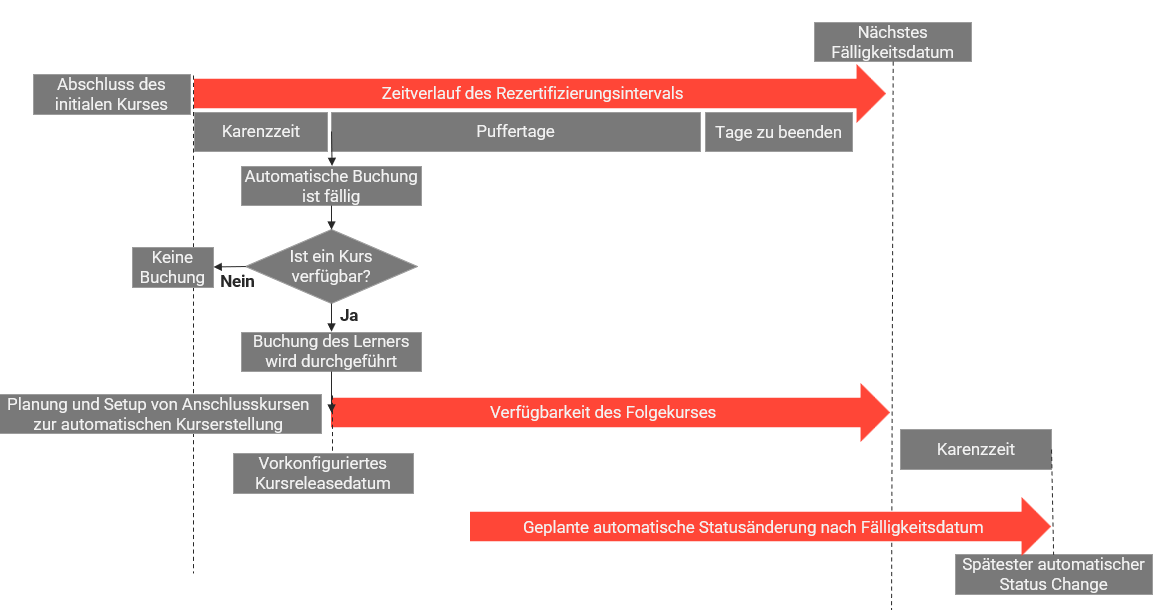
Die allgemeinen geschäftlichen Anforderungen des dargestellten Szenarios sind wie folgt:
-
Die Nutzer sollen den Einführungskurs erfolgreich beenden und in ihrem ersten Kurs in die Zielgruppe der Kursvorlage aufgenommen werden.
-
Wenn der erste Kurs erfolgreich beendet wurde:
-
Das Unternehmen möchte sicherstellen, dass Lerner sich nach Abschluss eines Kurses erst nach Ablauf einer festgelegten Wartezeit für einen Folgekurs anmelden können. Diese Wartezeit ist ein Zeitraum, in dem der Nutzer einen früheren Kurs erfolgreich beendet hat, sich aber noch nicht für einen Folgekurs registrieren kann. Dies ist ein konzeptioneller Aspekt, der jedoch nicht als Konfigurationsparameter in der imc Learning Suite berücksichtigt wird.
-
Das Unternehmen möchte sicherstellen, dass die Nutzer nach Ablauf der Wartezeit automatisch zu einem festgelegten Termin für den folgenden Kurs registriert werden, z. B. jeweils am 1.2. für jeden folgenden Kurs.
-
Um diesen geschäftlichen Anforderungen gerecht zu werden, werden die folgenden Systemprozesse und Parameter angewendet:
-
Der Lerner wird auf Kursvorlagenebene einem Kurs zur automatischen Buchung zugewiesen und am Tag der Zuweisung direkt angemeldet, sofern ein Kurs verfügbar ist.
-
Nach Abschluss des ersten Kurses setzt das System den Lernenden auf Kursvorlagen-Level auf „erfolgreich abgeschlossen“ und berechnet das nächste Fälligkeitsdatum für den folgenden Kurs.
-
Bei jedem Joblauf überprüft das System, ob die Buchung fällig ist, indem es „Nächstes Fälligkeitsdatum – Tage zum Beenden – Puffer <= heute“ überprüft.
-
Wenn die Buchung fällig ist, prüft das System, ob ein Kurs für die Buchung verfügbar ist. Ist dies der Fall, wird die Buchung im Rahmen desselben Joblaufs durchgeführt; es findet keine Buchung statt.
-
Wenn ein Unternehmen nur ein Rezertifizierungsintervall hat, kann ein solches Szenario ohne die Option funktionieren, die Durchführung der Buchung über die Verfügbarkeit des folgenden Kurses mit automatischer Kurserstellung zu steuern.
Bei Systemnutzungsszenarien mit unterschiedlichen Intervallen oder unterschiedlichen angestrebten wiederkehrenden Anmeldeterminen ist die Verwendung der automatischen Kurserstellung obligatorisch, um wiederkehrende Buchungen für verschiedene Szenarien zu erreichen. Dies wird im folgenden Abschnitt erläutert.
Systemweiter Steuerungsmechanismus
Die systemweit konfigurierten Puffertage wirken sich nicht nur auf einzelne Kursvorlagen für die Rezertifizierung aus, sondern auf alle eingerichteten Kursvorlagen, auch wenn das Rezertifizierungsintervall unterschiedlich ist und daher die wiederkehrenden geplanten Wiederanmeldetermine je nach Kursvorlage unterschiedlich sein sollten.
Die folgende Folie zeigt einige Beispiele für Rezertifizierungstrainings mit unterschiedlichen Rezertifizierungsintervallen in ein und demselben System.
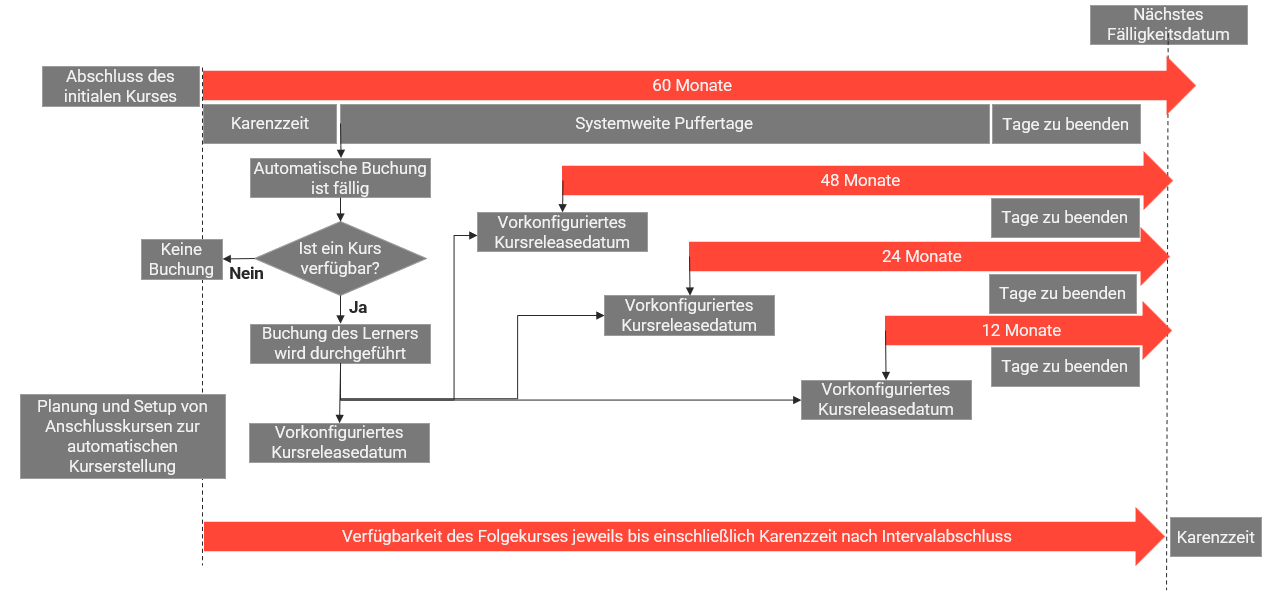
Herausforderungen in diesem Szenario:
Automatische Kurserstellungsintervalle können nur auf Tagesbasis, nicht jedoch auf Monatsbasis definiert werden, was eine manuelle Anpassung der automatischen Kurserstellung für Schaltjahre erforderlich macht. In Schaltjahren muss die Anzahl der Tage um einen Tag angepasst werden, damit das gleiche wiederkehrende Datum wie im Vorjahr erreicht wird.
Identifizierung des richtigen Zeitpunkts für die automatische Kurserstellung
Eine häufige Anforderung in Unternehmen ist, dass Kurse zur Buchung verfügbar sein sollten, wenn die Buchungsfrist beginnt. Das Problem bei der manuellen Kurserstellung ist, dass sie zeitaufwändig und fehleranfällig ist.
Stattdessen wird dringend empfohlen, Folgendes zu verwenden: automatische Kurserstellung. Die automatische Kurserstellung würde zu einer hohen Effizienz führen und den Verwaltungsaufwand minimieren, aber es ist schwierig zu bestimmen, wann Kurse erstellt werden sollen.
Lenkmechanismen
Kurse sollten automatisch mindestens vor Ablauf der Buchungsfrist erstellt werden (nächstes Fälligkeitsdatum – Tage zum Beenden – Puffer-Tage).
Es empfiehlt sich, die automatische Kurserstellung mit „Fristtyp“ als „Immer gültig am TT/MM“ und „Automatische Kursanmeldung“ als aktiv zu verwenden, damit wir ein festes Datum haben, bis zu dem der Kurs für alle Nutzer einer Zielgruppe automatisch erstellt werden muss. Sobald die Buchung fällig ist, wird der Nutzer für den neuesten verfügbaren Kurs registriert.
Das ursprüngliche Fälligkeitsdatum basierend auf TT/MM sollte mit dem für die Rezertifizierung gewählten Einsendeschluss übereinstimmen, damit von Anfang an ein 12-Monats-Zyklus erreicht wird.
Das Intervall für die Kurserstellung muss in Abhängigkeit von den Einstellungen für die Rezertifizierung der Zielgruppe festgelegt werden. Bei Zielgruppen mit unterschiedlichen Einstellungen muss die Zielgruppe mit dem kürzesten Intervall als Berechnungsgrundlage dienen.
Das Intervall für die Änderung des Planungsstatus sollte 0 sein, wenn die Kurse nach ihrer Erstellung sofort für die Buchung freigegeben werden müssen. Andernfalls sollte festgelegt werden, wann der Planungsstatus des Kurses automatisch von „Gesperrt” auf „Freigegeben” geändert werden soll. Diese Verzögerung ermöglicht es Administratoren, notwendige Änderungen vorzunehmen und zu steuern, wann ein Kurs für die Buchung verfügbar sein soll, wenn die Buchung aufgrund einer hohen Anzahl von Puffer-Tagen bereits fällig ist.
Beispiel (Einsendeschluss basierend auf dem Abschluss)
Das Intervall für die Kurserstellung sollte wie folgt berechnet werden
Kurserstellungsintervall = Rezertifizierungsintervall – Tage zum Beenden – Puffer-Tage
Nehmen wir folgende Einstellungen für die Zielgruppe an.
Puffer-Tage = 0d
Tage zum Beenden = 15 Tage
Rezertifizierungsintervall = 180 Tage
Kurserstellungsintervall = 180 Tage – 15 Tage – 0 Tage = 165 Tage
Nehmen wir an, dass fünf Lerner in den Rezertifizierungsprozess einbezogen werden müssen.
Die folgenden Tabellen zeigen den Ablauf für diese Lerner für jeden der 7 automatisch erstellten Kurse. z. B.
-
Lerner 1 beendet die Kurse, sobald er registriert ist.
-
Lerner 2 beendet die Kurse erfolgreich, jedoch entweder am oder kurz vor dem Fälligkeitsdatum.
-
Lerner 3 beendet die Kurse erfolgreich, jedoch mit 5 Tagen Verspätung.
-
Lerner 4 hat keinen Teil des Kurses erfolgreich beendet und ist aus dem Rezertifizierungsprozess ausgeschieden.
-
Lerner 5 beendet die Kurse erfolgreich, ist jedoch immer um eine enorme Anzahl von Tagen (z. B. 330 Tage) im Verzug. Es ist wichtig zu beachten, dass sich Lerner 5 zwar im Rezertifizierungsprozess befindet, jedoch nicht alle 6 Monate zertifiziert wird, da er die Kurse mit einer enormen Anzahl von Tagen im Verzug absolviert, die länger sind als das Rezertifizierungsintervall selbst.
Um die Lerner 4 und 5 in den Rezertifizierungsprozess einzubeziehen, Es gibt verschiedene Möglichkeiten, mit dem Gleichen umzugehen..
Aus den folgenden Tabellen geht hervor, dass, obwohl die fünf Lernenden die Kurse zu unterschiedlichen Zeitpunkten absolvieren, bei einem Kurserstellungsintervall von 165 Tagen (Rezertifizierungsintervall – Tage zum Beenden – Puffer-Tage) automatisch ein Kurs erstellt wird, bevor die Buchung fällig ist (nächstes Fälligkeitsdatum – Tage zum Beenden – Puffer-Tage) und steht dem Lerner zum Zeitpunkt der Buchung jederzeit zur Verfügung.
|
Lerner |
Kurserstellungsdatum (1. Kurs) |
Buchungstag |
Fälligkeitsdatum (Datum der Buchung + Tage zum Beenden) |
Fertigstellungstermin |
Nächstes Fälligkeitsdatum oder Ablaufdatum (Fertigstellungsdatum + Rezertifizierungsintervall) |
Berechneter nächster Anmeldetermin (nächstes Fälligkeitsdatum – Tage zum Beenden – Puffer-Tage) |
|---|---|---|---|---|---|---|
|
1 |
30. Dezember 2024 |
|
16. Januar 2025 |
|
|
17. Juni 2025 |
|
2 |
30. Dezember 2024 |
|
16. Januar 2025 |
|
|
19. Juni 2025 |
|
3 |
30. Dezember 2024 |
|
16. Januar 2025 |
30. Januar 2025 |
30. Juli 2025 |
15. Juli 2025 |
|
4 |
30. Dezember 2024 |
|
16. Januar 2025 |
Wartend auf Fertigstellung. Verwenden Sie Eskalations-E-Mails zur Erinnerung. |
Keine |
Keine |
|
5 |
30. Dezember 2024 |
|
16. Januar 2025 |
12. Dezember 2025 (330 Tage überfällig) |
10. Juni 2026 |
|
Lerner |
Kurserstellungsdatum (2. Kurs) |
Datum der Buchung |
Fälligkeitsdatum (das spätere der beiden folgenden Daten: Datum der Buchung + Tage zum Beenden) |
Fertigstellungstermin |
Nächstes Fälligkeitsdatum oder Ablaufdatum (Fertigstellungsdatum + Rezertifizierungsintervall) |
Berechneter nächster Termin für die Buchung des dritten Kurses (nächstes Fälligkeitsdatum – Tage zum Beenden – Puffer-Tage) |
|---|---|---|---|---|---|---|
|
1 |
13. Juni 2025 |
17. Juni 2025 |
|
20. Juni 2025 |
20. Dezember 2025 |
|
|
2 |
13. Juni 2025 |
19. Juni 2025 |
|
15. Juli 2025 |
15. Januar 2026 |
31. Dezember 2025 |
|
3 |
13. Juni 2025 |
15. Juli 2025 |
30. Juli 2025 |
15. August 2025 |
15. Februar 2026 |
31. Januar 2026 |
|
4 |
13. Juni 2025 |
Keine |
Keine |
Wartend auf Fertigstellung. Verwenden Sie Eskalations-E-Mails zur Erinnerung. |
Keine |
Keine |
|
5 |
13. Juni 2025 |
26. Mai 2026 → Keine |
Keine |
Der Nutzer ist nicht registriert. |
Keine |
Keine |
|
Lerner |
Kurserstellungsdatum (3. Kurs) |
Datum der Buchung |
Fälligkeitsdatum (das spätere der beiden folgenden Daten: Datum der Buchung + Tage zum Beenden) |
Fertigstellungstermin (mit unterschiedlichen Fertigstellungszeitplänen) |
Nächstes Fälligkeitsdatum oder Ablaufdatum (Fertigstellungsdatum + Rezertifizierungsintervall) |
Berechneter nächster Termin für die Buchung des dritten Kurses (nächstes Fälligkeitsdatum – Tage zum Beenden – Puffer-Tage) |
|---|---|---|---|---|---|---|
|
1 |
25. November 2025 |
|
20. Dezember 2025 |
|
|
19. Mai 2026 |
|
2 |
25. November 2025 |
31. Dezember 2025 |
15. Januar 2026 |
15. Januar 2026 (so spät wie möglich, aber noch fällig) |
14. Juli 2026 |
29. Juni 2026 |
|
3 |
25. November 2025 |
31. Januar 2026 |
15. Februar 2026 |
20. Februar 2026 (5 Tage nach Fälligkeitsdatum) |
19. August 2026 |
04. August 2026 |
|
4 |
25. November 2025 |
Keine |
Keine |
Wartend auf Fertigstellung. Verwenden Sie Eskalations-E-Mails zur Erinnerung. |
Keine |
Keine |
|
5 |
25. November 2025 |
26. Mai 2026 → Keine |
Keine |
Der Nutzer ist nicht registriert. |
Keine |
Keine |
|
Lerner |
Kurserstellungsdatum (4. Kurs) |
Buchungstag |
Fälligkeitsdatum (das spätere der beiden folgenden Daten: Datum der Buchung + Tage zum Beenden) |
Fertigstellungstermin (mit unterschiedlichen Fertigstellungszeitplänen) |
Nächstes Fälligkeitsdatum oder Ablaufdatum (Fertigstellungsdatum + Rezertifizierungsintervall) |
Berechneter nächster Termin für die Buchung des dritten Kurses (nächstes Fälligkeitsdatum – Tage zum Beenden – Puffer-Tage) |
|---|---|---|---|---|---|---|
|
1 |
09. Mai 2026 |
19. Mai 2026 |
|
19. Mai 2025 (so früh wie möglich) |
15. November 2026 |
31. Oktober 2026 |
|
2 |
09. Mai 2026 |
29. Juni 2026 |
14. Juli 2026 |
14. Juli 2026 (so spät wie möglich, aber noch fällig) |
10. Januar 2027 |
26. Dezember 2026 |
|
3 |
09. Mai 2026 |
04. August 2026 |
19. August 2026 |
24. August 2026 (5 Tage nach dem Fälligkeitsdatum) |
20. Februar 2027 |
05. Februar 2027 |
|
4 |
09. Mai 2026 |
Keine |
Keine |
Wartend auf Fertigstellung. Verwenden Sie Eskalations-E-Mails zur Erinnerung. |
Keine |
Keine |
|
5 |
09. Mai 2026 |
26. Mai 2026 |
10. Juni 2026 |
|
02. November 2027 |
18. Oktober 2027 |
|
Lerner |
Kurserstellungsdatum (5. Kurs) |
Datum der Buchung |
Fälligkeitsdatum (das spätere der beiden folgenden Daten: Datum der Buchung + Tage zum Beenden) |
Fertigstellungstermin (mit unterschiedlichen Fertigstellungszeitplänen) |
Nächstes Fälligkeitsdatum oder Ablaufdatum (Fertigstellungsdatum + Rezertifizierungsintervall) |
Berechneter nächster Termin für die Buchung des dritten Kurses (nächstes Fälligkeitsdatum – Tage zum Beenden – Puffer-Tage) |
|---|---|---|---|---|---|---|
|
1 |
21. Oktober 2026 |
31. Oktober 2026 |
15. November 2026 |
31. Oktober 2026 (so früh wie möglich) |
29. April 2027 |
14. April 2027 |
|
2 |
21. Oktober 2026 |
26. Dezember 2026 |
10. Januar 2027 |
10. Januar 2027 (so spät wie möglich, aber noch fällig) |
09. Juli 2027 |
24. Juni 2027 |
|
3 |
21. Oktober 2026 |
05. Februar 2027 |
20. Februar 2027 |
25. Februar 2027 (5 Tage nach dem Fälligkeitsdatum) |
24. August 2027 |
09. August 2027 |
|
4 |
21. Oktober 2026 |
Keine |
Keine |
Wartend auf Fertigstellung. Verwenden Sie Eskalations-E-Mails zur Erinnerung. |
Keine |
Keine |
|
5 |
21. Oktober 2026 |
18. Oktober 2027 → Keine |
Keine |
Der Nutzer ist nicht registriert. |
Keine |
Keine |
|
Lerner |
Kurserstellungsdatum (6. Kurs) |
Datum der Buchung |
Fälligkeitsdatum (das spätere der beiden folgenden Daten: Datum der Buchung + Tage zum Beenden) |
Fertigstellungstermin (mit unterschiedlichen Fertigstellungszeitplänen) |
Nächstes Fälligkeitsdatum oder Ablaufdatum (Fertigstellungsdatum + Rezertifizierungsintervall) |
Berechneter nächster Termin für die Buchung des dritten Kurses (nächstes Fälligkeitsdatum – Tage zum Beenden – Puffer-Tage) |
|---|---|---|---|---|---|---|
|
1 |
|
14. April 2027 |
29. April 2027 |
14. April 2027 (so früh wie möglich) |
11. Oktober 2027 |
26. September 2027 |
|
2 |
|
24. Juni 2027 |
09. Juli 2027 |
09. Juli 2027 (so spät wie möglich, aber noch fällig) |
|
21. Dezember 2027 |
|
3 |
|
09. August 2027 |
24. August 2027 |
29. August 2027 (5 Tage nach dem Fälligkeitsdatum) |
25. Februar 2028 |
10. Februar 2028 |
|
4 |
|
Keine |
Keine |
Wartend auf Fertigstellung. Verwenden Sie Eskalations-E-Mails zur Erinnerung. |
Keine |
Keine |
|
5 |
|
18. Oktober 2027 → Keine |
Keine |
Der Nutzer ist nicht registriert. |
Keine |
Keine |
|
Lerner |
Kurserstellungsdatum (7. Kurs) |
Buchungstag |
Fälligkeitsdatum (das spätere der beiden folgenden Daten: Datum der Buchung + Tage zum Beenden) |
Fertigstellungstermin (mit unterschiedlichen Fertigstellungszeitplänen) |
Nächstes Fälligkeitsdatum oder Ablaufdatum (Fertigstellungsdatum + Rezertifizierungsintervall) |
Berechneter nächster Anmeldetermin für den dritten Kurs (nächstes Fälligkeitsdatum – Tage zum Beenden – Puffer-Tage) |
|---|---|---|---|---|---|---|
|
1 |
16. September 2027 |
26. September 2027 |
11. Oktober 2027 |
26. September 2027 (so früh wie möglich) |
25. März 2028 |
10. März 2028 |
|
2 |
16. September 2027 |
21. Dezember 2027 |
|
|
|
19. Juni 2028 |
|
3 |
16. September 2027 |
10. Februar 2028 |
25. Februar 2028 |
|
29. August 2028 |
14. August 2028 |
|
4 |
16. September 2027 |
Keine |
Keine |
Wartend auf Fertigstellung. Verwenden Sie Eskalations-E-Mails zur Erinnerung. |
Keine |
Keine |
|
5 |
16. September 2027 |
18. Oktober 2027 |
02. November 2027 |
28. September 2028 (330 Tage überfällig) |
27. März 2029 |
12. März 2029 |
Rezertifizierungstraining mit einem Einsendeschluss, der sich nach dem Abschluss richtet
Wenn jede Person persönlich zertifiziert werden muss und es nicht erforderlich ist, dass die gesamte Organisation zu einem bestimmten Zeitpunkt im Jahr zertifiziert wird, z. B. bei Erste-Hilfe-Kursen, sollte in solchen Fällen die Fristart „basierend auf dem Abschluss“ verwendet werden.
Der Vorteil liegt in der individuellen Flexibilität.
Der Nachteil ist
-
Wenn eine Person zu früh registriert wird, weil die Tage zum Beenden und die Puffer-Tage höher sind, gibt es für den Lerner keine ausreichende Pause zwischen zwei Trainings, da er, sobald er das erste Training abgeschlossen hat, für das nächste Training registriert wird.
-
Es ist nicht vorhersehbar, wann das Training angeboten werden soll. Die automatische Kurserstellung lässt sich nicht planen, da es keinen gemeinsamen Anmeldetermin für die Nutzer gibt.
Lenkmechanismen
-
Der Administrator muss sicherstellen, dass ein Kurs immer verfügbar ist, entweder durch Automatische Buchung oder durch manuelles Erstellen des Kurses.
-
Wenn verschiedene Zielgruppen unterschiedliche Rezertifizierungsintervalle haben, sollten Kurse automatisch entsprechend dem kürzesten Rezertifizierungsintervall erstellt werden.
-
Der TeilnehmerAutomatischeRegistrierungsJob sollte täglich in der Zeitplanung berücksichtigt werden, um die Buchungen aller Nutzer zu berücksichtigen. Da das Anmeldedatum erheblich variieren kann, insbesondere wenn das Fälligkeitsdatum auf dem Abschluss basiert.
Rezertifizierungstraining mit Einsendeschluss, der auf einem konkreten Datum im Jahr basiert
Für eine bestimmte Gruppe von Lernenden kann es geschäftlich erforderlich sein, dass die Mitarbeiter bis zu einem bestimmten Zeitpunkt zertifiziert sein müssen. Für alle sollte ein einheitlicher Einsendeschluss gelten, z. B. für Auffrischungstrainings für zu bedienende Maschinen oder saisonabhängige Trainings.
Lenkmechanismen
Einsendeschluss-Typ = Immer gültig am TT/MM
-
Stellen Sie sicher, dass die Mitarbeiter das Auffrischungs-Training bis zu einem bestimmten Zeitpunkt im Jahr absolvieren.
-
Außerdem sind für alle Teilnehmer das nächste Fälligkeitsdatum und der Termin für die Buchung identisch, sodass die automatische Kurserstellung genutzt werden kann, um sicherzustellen, dass ein Kurs immer verfügbar ist, wenn die Buchung fällig ist.
-
Das ursprüngliche Fälligkeitsdatum auf Basis von TT/MM sollte mit dem für die Rezertifizierung gewählten Einsendeschluss übereinstimmen, damit von Anfang an ein 12-Monats-Zyklus erreicht wird.
Rezertifizierung auf Basis der Selbstanmeldung
Für den Geschäftsfall, in dem der Lerner ein Präsenztraining absolvieren muss und einen für ihn geeigneten Termin/Ort auswählen muss, ist die Selbstanmeldung eine Option, die jedoch nicht empfohlen wird, da es bei einer Selbstanmeldung sehr schwierig ist, sicherzustellen, dass sich der Lerner zum Termin der Buchung selbst für den Kurs registriert und möglicherweise verspätet beginnt. Außerdem ist es schwierig, in solchen Fällen die automatische Kurserstellung zu nutzen, da der Mindestabstand zwischen der Erstellung von zwei Kursen 28 Tage beträgt und es möglicherweise notwendig ist, Kurse mit einem geringeren Abstand zwischen den Terminen anzubieten.
Stattdessen wird empfohlen, die Einstellung „Automatische Buchung“ zu aktivieren, um sicherzustellen, dass die Teilnehmer automatisch für einen Kurs angemeldet werden, wenn das „Nächste Fälligkeitsdatum – Tage zum Beenden – Puffer-Tage“ erreicht ist und ein Kurs verfügbar ist.
Lenkmechanismen
-
Selbstanmeldung
-
Manuelle Erstellung von Kursen
Direkte Buchung des Lernenden
Wenn es geschäftlich notwendig ist, dass Lerner sofort nach ihrer Rückkehr zur Zielgruppe registriert werden müssen, wenn sie sich außerhalb des Rezertifizierungszyklus befinden, sollte „Neu hinzugefügte Gruppenmitglieder berücksichtigen“ aktiviert werden.
Lenkmechanismen
Es wird empfohlen, die Option „Neu hinzugefügte Gruppenmitglieder berücksichtigen“ zu aktivieren, damit die Nutzer der Gruppen/Jobprofile regelmäßig überprüft und für den Rezertifizierungsprozess berücksichtigt werden. Wenn diese Option deaktiviert ist, werden nur die Nutzer zum Zeitpunkt der Zuweisung der Gruppe/des Jobprofils berücksichtigt und später nicht aktualisiert.
Umgang mit überfälligen Nutzern
Es wird empfohlen, die Einstellung „Automatische Statusänderung nach Fälligkeitsdatum“ zu aktivieren, damit die überfälligen Nutzer, die noch in Bearbeitung oder Gebucht sind, abgesagt/bestanden/nicht bestanden werden und für eine weitere Buchung berücksichtigt werden.
In Kombination mit der Einstellung „Wieder angemeldete, abgesagte und nicht erfolgreiche Nutzer zum nächsten Rezertifizierungskurs“ können die abgesagten und nicht erfolgreichen Nutzer wieder in den Rezertifizierungszyklus aufgenommen werden.
Umgang mit Nutzern, die manuell zu einem Kurs registriert wurden
Nutzer, die manuell zu einem Kurs registriert werden, werden genauso behandelt wie Nutzer, die durch Automatische Buchung registriert werden. Es gibt keinen Unterschied.
Auch für diese Nutzer wird, sobald sie den Kurs erfolgreich beendet haben, das nächste Fälligkeitsdatum berechnet und die Buchung entsprechend dem Anmeldedatum vorgenommen.
Verwendung vorhandener Kursvorlagen für die Rezertifizierung
Bitte beachten Sie, dass die bisher für Kurse ohne Rezertifizierung verwendeten Kursvorlagen möglicherweise für die spätere Zuweisung der Zielgruppe für die Rezertifizierung verwendet werden könnten, dies jedoch nicht empfohlen wird. In diesem Fall würden abgeschlossene Kurse mit oder ohne Fälligkeitsdatum nicht im Sinne einer gültigen Zertifizierungsdauer berücksichtigt werden. Daher gelten die Nutzer, die den Kurs vor ihrer Zuweisung zur Zielgruppe erfolgreich beendet haben, als ursprüngliche Mitglieder der Zielgruppe und Berechnung des initialen Fälligkeitsdatums Anwenden.
Nebenwirkungen vermeiden
Bitte beachten Sie, dass die Einstellung „Lernenden ermöglichen, die Vormerkung aus Kursvorlagen zu entfernen„ kann den Rezertifizierungsprozess beeinträchtigen, da diese Einstellung es den Lernern ermöglicht, die Voranmeldung für Kursvorlagen zu entfernen. Der Rezertifizierungsprozess hängt in hohem Maße vom Status der Lernvorgabe ab, da der Nutzer, sobald die Buchung fällig ist, automatisch für den neuesten verfügbaren Kurs angemeldet wird.
Aus diesem Grund wird dringend empfohlen, diese Einstellung für den Lernbereich nicht zu aktivieren.
Tage zum Beenden im Vergleich zu Puffer-Tagen
Die Verwendung einer hohen Anzahl von Tagen, um das Training erfolgreich zu beenden, d. h. ihre semantische Bedeutung.
Die Verwendung einer hohen Anzahl von Tagen zum Beenden des Kurses, d. h. deren semantische Bedeutung. Die Anzahl der Tage zum Beenden des Kurses sollte so kurz sein wie die Mindestzeit, die ein Lerner benötigt, um das Training zu beenden, und nicht im Sinne von „Ich gebe dem Lernenden so viel Zeit wie möglich, um das Training im Kalender zu planen und zu beenden“. Hintergrund hierfür ist der Umgang mit neuen Mitarbeitern, die sich möglicherweise bereits in einer Rezertifizierungslücke befinden und daher so schnell wie möglich rezertifiziert werden müssen. Eine hohe Anzahl von Tagen zum Beenden widerspricht dem. Die Puffer-Tage hingegen dienen genau dem Zweck, die Verfügbarkeit eines Kurses zu verlängern, damit der Lerner mehr Flexibilität bei der Zeitplanung des Kurses hat. Derzeit können Puffer-Tage jedoch nur systemweit definiert werden, sodass sie sich auf alle Rezertifizierungsszenarien auswirken. Das bedeutet, dass
-
Alle Szenarien müssen berücksichtigt werden, um die jeweilige Kombination aus Puffer-Tagen und Tagen zum Beenden zu bestimmen.
-
Die längsten notwendigen Puffer-Tage werden in der Konfiguration festgelegt.
-
Da dies bei kürzeren Szenarien zu einer vorzeitigen Buchung führen könnte, ist es notwendig, die Buchung dieser Szenarien nicht über die Berechnung des Buchungsstatus mit „Nächstes Fälligkeitsdatum – Tage zum Beenden – Puffer-Tage” zu steuern, sondern über die Verfügbarkeit eines Kurses zur Buchung mittels automatischer Kurserstellung.
Dieser Prozess wird anhand der folgenden Beispiele erläutert.
Beispiele:
Nachfolgend finden Sie Beispiele dafür, wie Sie unserer Meinung nach die Tage zum Beenden für verschiedene Intervalle eingeben würden, um das Anmeldedatum zu beeinflussen.
Tage zum Beenden: 1825 für ein Rezertifizierungsintervall von 60 Monaten
Tage zum Beenden: 730 für ein Rezertifizierungsintervall von 24 Monaten
Tage zum Beenden: 365 für ein Rezertifizierungsintervall von 12 Monaten
Tage zum Beenden: 182 für ein Rezertifizierungsintervall von 6 Monaten
Anstatt die Tage zum Beenden so hoch anzusetzen, wählen wir stattdessen 30 Tage, und die Buchung wird über die Puffer-Tage und die automatische Kurserstellung gesteuert.
Globale Funktionen und verwandte Themen
Rezertifizierung Konfiguration
Rezertifizierung - Berechnung des initialen Fälligkeitsdatums
Rezertifizierung _ Berechnung des Nächsten Fälligkeitsdatums
Rezertifizierung - Nächstes Buchungsdatum