
ID=162
Dieses Panel zeigt die Kurse an, die der Lernvorgabe zugewiesen sind. Es wird auf der internen Portalseite in der Standardkonfiguration des Lernportals verwendet.
Die Konfiguration des Panels ähnelt der des „Panels – Aktuelle Kurse“.
Panel-Einstellungen
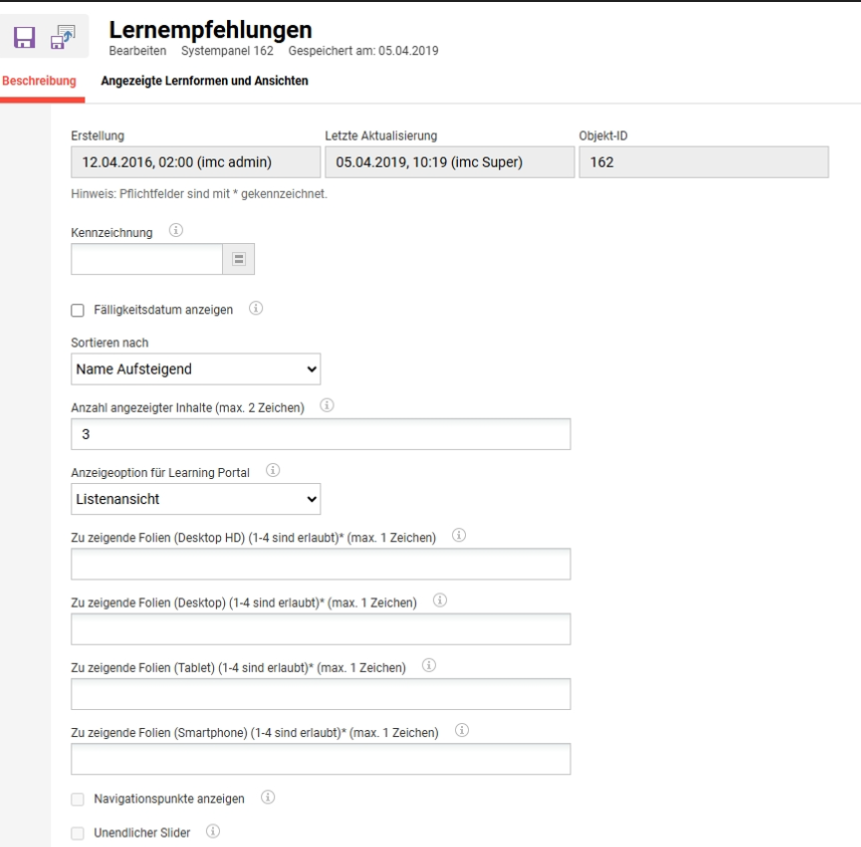
Über das Feld “Kennzeichnung” kann festgelegt werden, ob z. B. nur Pflichtkurse auf einem Panel angezeigt werden sollen.
|
Einstellung |
Was bewirkt diese Einstellung |
|---|---|
|
Kennzeichnung |
Durch Auswahl einer oder mehrerer Identifikatoren kann eingeschränkt werden, welche Inhalte im Panel angezeigt werden. Zum Beispiel können so nur Pflichtkurse ausgegeben werden. Verfügbare Optionen
|
|
Fälligkeitsdatum anzeigen |
Ist die Checkbox markiert, wird das Fälligkeitsdatum der Kurse im Panel angezeigt. |
|
Sortieren nach |
|
Anzahl der angezeigten Inhalte
Mit dieser Option kann festgelegt werden, wie viel Inhalt im Panel angezeigt wird. Sind weitere Inhalte verfügbar, wird ein Link zu allen Inhalten (z. B. allen aktuellen Kursen) angezeigt. Ist das Feld leer, werden alle verfügbaren Inhalte angezeigt.
Die Karussellansicht bietet zusätzliche Konfigurationsmöglichkeiten für den Panel-Inhalt, um verschiedene Ansichten im Lernportal anzuzeigen.
Je nach Bildschirmtyp können bis zu 4 Kacheln für die im Lernportal anzuzeigenden Inhalte und maximal 1 Zeichen pro Abschnitt konfiguriert werden. Es gibt 4 Bildschirmtypen: Desktop HD, Desktop, Tablet, Smartphone.
Darüber hinaus bietet die Karussellansicht zwei weitere Optionen, die je nach bevorzugter Inhaltsansicht ausgewählt werden können: Navigationspunkte anzeigen und Unendlicher Schieberegler.
Bei Lernpfaden ist diese Option nur verfügbar, wenn im Panel inhaltsgesteuerte Pfade verwendet werden. Bei stufenbasierten Lernpfaden wird nur eine einzige Art der Anzeige unterstützt, daher wird diese Einstellung als deaktiviert angezeigt.
|
Einstellung |
Was bewirkt diese Einstellung |
|---|---|
|
Anzeigeoption für Learning Portal |
Panel-Inhalte können im Lernportal in verschiedenen Ansichten dargestellt werden. Hierfür stehen mehrere Möglichkeiten zur Verfügung. Entweder kann die Kartenansicht oder die Listenansicht verwendet werden. Alternativ gibt es die Möglichkeit, einen Schieberegler mit einer oder mehreren Kacheln im Fokus darzustellen, während andere Kacheln über Schaltflächen oder durch Wischen auf einem Touchscreen gesteuert werden können. |
|
Zu zeigende Folien (Desktop HD / Desktop / Tablet / Smartphone) |
Legt fest, wie viele Slides je Bildschirmtyp angezeigt werden, für Desktop HD, Desktop, Tablet und Smartphone, wenn die Karussellansicht verwendet wird. Je Bildschirmtyp sind zwischen 1 und 4 Slides zulässig, für jedes der vier Felder ist ein Wert erforderlich |
|
Navigationspunkte anzeigen |
Ermöglicht die Anzeige der Navigationspunkte unterhalb des Bedienfelds, wenn der Layouttyp Karussell verwendet wird. |
|
Unendlicher Slider |
Zeigt eine pfeilbasierte Navigation am oberen Rand des Karussells an. Die Navigation ist fortlaufend und beginnt wieder am Anfang, wenn das Ende der Liste erreicht ist. |
Angezeigte Lernformen und Ansichten
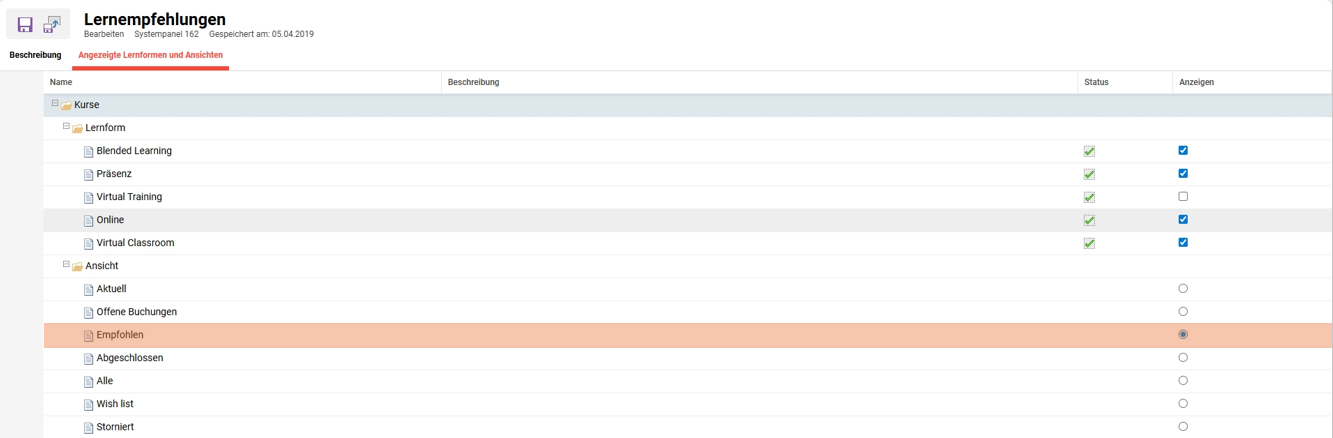
Auf dem Tab „Angezeigte Lernformen und Ansichten“ kann festgelegt werden, welche Lernformen in den Kursen berücksichtigt und auf den Panels angezeigt werden sollen.
Lernform
Listet die verfügbaren Lernformen von Kursen auf: Blended Learning, Classroom Training, Virtual Training, Virtual Classroom und Online. Jede Lernform verfügt über zwei Indikatoren:
-
Status: Zeigt an, ob die Lernform im System aktiv ist. Dies ist ein reiner Anzeigewert und kann auf diesem Tab nicht geändert werden.
-
Ansicht: Legt fest, ob Kurse dieser Lernform im Panel berücksichtigt werden. Nur Lernformen, bei denen Ansicht aktiviert ist, werden angezeigt.
Ansicht
Legt fest, welcher Status für die im Panel angezeigten Inhalte verwendet wird. Es kann jeweils nur ein Status ausgewählt werden: Aktuell, Ausstehende Buchungen, Lernempfehlungen, Erfolgreich abgeschlossen, Alle, Wunschliste, Storniert.
Verwandte Funktionen
Konfigurationsmanager – Buchung | Identifikatoren für die Buchung
Katalogmanager
Panels
Portalseiten Administration