
ID = 188
Dieses Panel ermöglicht die Erstellung personalisierter Verknüpfungen für eine einfachere Navigation und bietet Quick Links zu externen Seiten.
Panel-Einstellungen
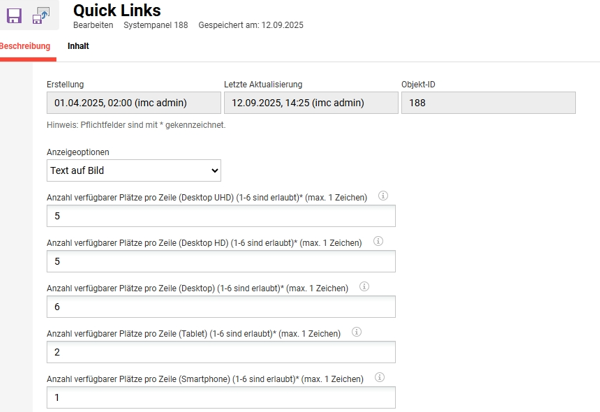
Anzeigeoptionen
Wählen Sie aus, wie die Quick Links angezeigt werden sollen.
-
Text auf Bild

-
Text unter dem Bild

-
Nur Text

Anzahl der verfügbaren Plätze pro Zeile
Diese Einstellungen bestimmen die Anzahl der im Panel für jedes Gerät angezeigten Leerzeichen.
Inhalt
-20260422-085826.jpeg?cb=c813f086266e3f503f68f5704fb25df4)
Ein „Quick Link“-Element kann auf der Tab „Inhalt“ ausgewählt und konfiguriert werden. Es gibt keine Beschränkung hinsichtlich der Anzahl der Elemente, die dem Panel hinzugefügt werden können. Es wird jedoch empfohlen, nicht mehr als sechs Elemente zu verwenden, damit das Panel seinen Zweck der schnellen Navigation erfüllen kann.
|
Einstellung |
Was bewirkt diese Einstellung? |
|---|---|
|
Anzeigen bis |
Mit dieser Einstellung kann ein Datum festgelegt werden, bis zu dem der Link angezeigt wird. |
|
Text anzeigen |
Für den Quick Link ist die URL notwendig. Dieser Text erscheint auf der Karte basierend auf den „Anzeigeoptionen“ im Tab „Beschreibung“. |
|
Linktyp |
Es können interne und externe Links hinzugefügt werden. Für den internen Link steht ein Pop-up-Fenster mit Navigationselementen zur Auswahl zur Verfügung. |
|
Doppelte Größe |
Man könnte erwägen, die Breite eines Elements im Raster zu vergrößern, um es effektiv hervorzuheben. Wenn man beispielsweise fünf Karten in einer Reihe auf dem Desktop anzeigen und gleichzeitig sicherstellen möchte, dass eine Karte besonders hervorsticht, muss das Layout im Tab „Beschreibung“ so angepasst werden, dass sechs Karten pro Reihe angezeigt werden können. |
Tipps & Tricks
Da die Anzeige des URL-Textes notwendig ist, besteht eine Abhilfe darin, als Wert hinzuzufügen. Auf diese Weise wird nur ein Leerzeichen angezeigt, um lediglich ein Bild darzustellen, was besonders für „Text auf Bild“ nützlich ist.
Verwandte Funktionen