
Context
The global content search was built as a basis for upcoming AI features such as the AI Learner Assistant that require access to all learning content (as a knowledge source) and identify what is relevant for the user request. It currently analyses meta-information of content like title, description and keywords. A deeper analysis of learning content is in preparation.
The global search has been released to all Kubernetes customers and can be made available to users by your administrator via a navigation point. Customers with various content areas and therefore multiple access points (several catalogues, channels add-on, content directly assigned to learners and only visible in the My Learning area) will benefit the most from this feature.
Headless scenarios where the search is used without its front end are possible. Please contact imc for further information on that topic.
Multiple Search Bars and Entry Points to Content
-
The global search and the existing catalogue search will continue to run in parallel until further notice. Please rest assured: we will not replace any current functionality without clear and timely communication. However, for the future, the idea is to make the catalogues a place where you can promote your content in a more appealing way and learners can have a more inspiring browsing experience. The global search could then be the more targeted access point.
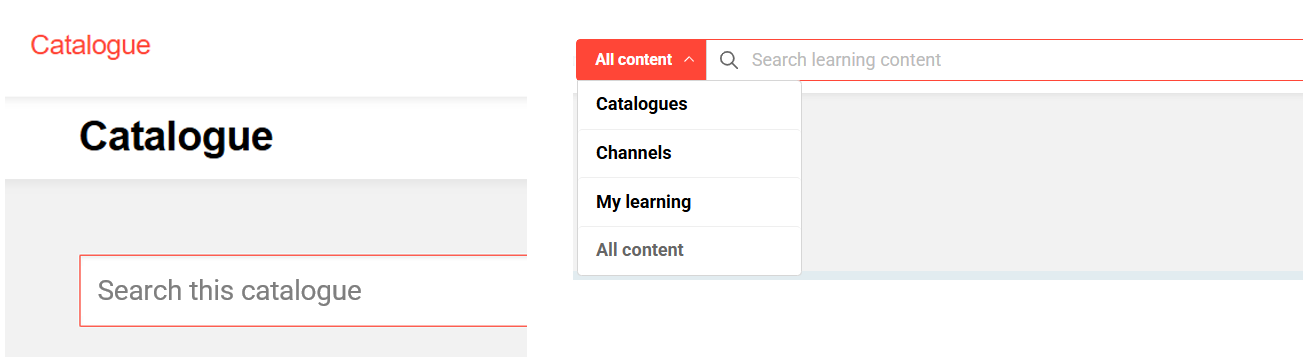
Catalogue Search Global Search
-
The two search functions are based on different technologies, approaches, and scopes—which is why their results may differ. With product version 14.27.1 the scope of the global search covers all catalogues, channels and content from My Learning area that has a personal learning status. The catalogue search, on the other hand, only searches within a catalogue.
-
For customers with multiple catalogues and Channels (add-on) and content that is not assigned to catalogues but directly to learners, the global search could become the primary access point to content. You may want to review whether some of the additional search bars - such as those in dashboard panels - can be hidden so as not to overwhelm the user with too many search bars of different scopes.
-
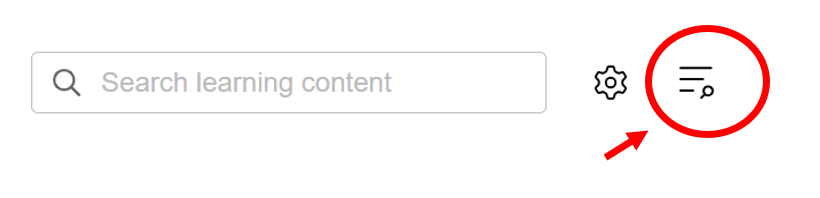
For your information: The navigation search, mainly used by admins and managers to find pages in the system, can still be accessed via the top navigation but now via this icon:
User assistance
-
You might want to consider to use titles or placeholder texts (within other search bars) to give the users a hint at what they search through in that particular case.
-
In the “system texts” administration you can change the standard wording of the global search UI to match your corporate wording. For example, you can change the wording of the content areas “Catalogue” or “Channels” or “My Learning”.
Data protection notice
-
Search queries are processed in such a way that they cannot be traced back to individual persons, but are associated solely with the technical system from which they originated. No personal data is collected, stored, or linked to specific users during the processing of search queries.
-
Search terms used in queries are stored exclusively for anonymised reporting purposes. In the future imc will provide Customers with a report designed to help them understand general search behaviour, such as commonly used terms and how many results were displayed. The report will not contain any data that would allow identification of individual users or their specific queries.
-
We recommend advising users not to enter sensitive or personal information into search queries, as these terms may appear in anonymised reports that could be accessible to administrators or others within your organisation, depending on how data is shared.
Decide on the best search type for your system
-
As described in the functional reference the content search supports two search types or modes:
-
Lexical Search
This mode directly matches the words from the user's query with titles, descriptions, and keywords of learning content. It’s a purely text-based lookup - no artificial intelligence involved. -
Semantic Search
In this mode, both the indexed learning content and the user’s query are converted into vectors and embeddings using AI technologies. This allows the system to detect semantic similarities and retrieve related concepts and themes even if they are phrased differently from the query.
-
-
If your organisation does not want to allow any further AI services to be deployed to your system you can stay with lexical search. If you can choose, the following table can help make a decision.
|
|
Lexical search |
Semantic Search |
|---|---|---|
|
Ranking of results |
Content with the exact words of the user query in the title will rank highest.
Advantage:
This is the better option if users often search for single keywords, corporate abbreviations or exact titles, because this requires an exact match not a similar. Challenge: The user has to use the same wording as in the titles, keywording and description. |
Content considered most relevant for the user query is ranked highest. Title and description are considered. Advantage:
Challenge:
|
|
Pre-requisites |
Usually none -
Users have to mind their spelling and keep the search queries rather short. |
Data quality:
User search behaviour: The more context a user provides with the query the better the results. Example:
|