
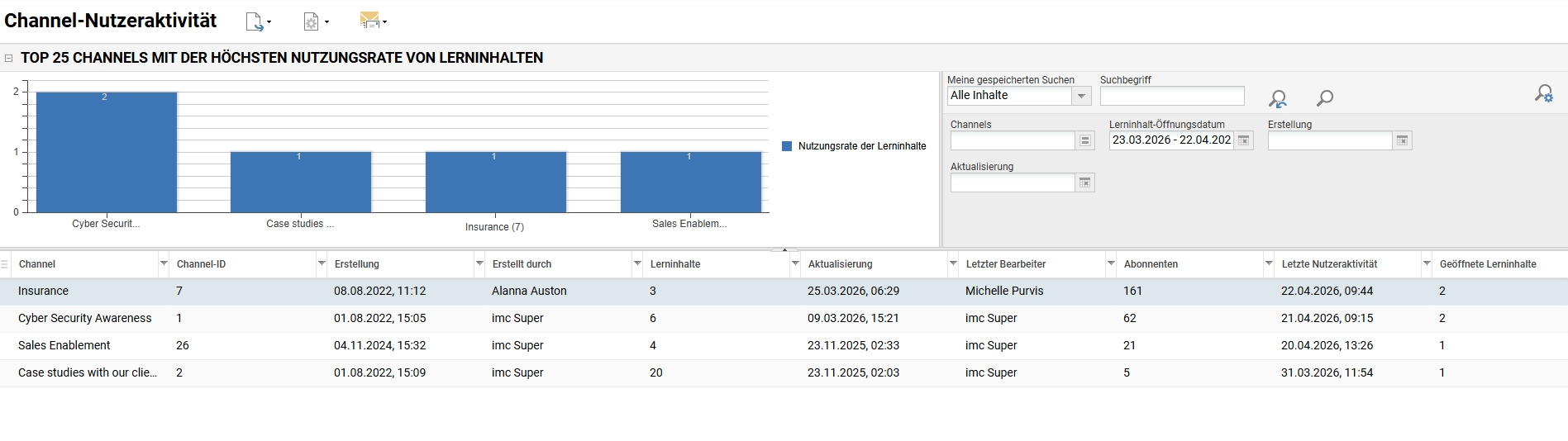
Der Report zur Nutzeraktivität in Kanälen wertet die Nutzeraktivität innerhalb von Kanälen aus, um umsetzbare Erkenntnisse zu gewinnen, wie zum Beispiel:
-
Nachweis, dass Kanäle nicht nur abonniert, sondern auch aktiv genutzt werden.
-
Identifizierung und Vergleich von leistungsstarken und leistungsschwachen Channels.
-
Überwachung von Veränderungen im Nutzerverhalten aufgrund von Änderungen der Channel-Inhalte.
Der Report zur Channelbenutzeraktivität kann dem Channeladministrator dabei helfen,
-
Verbessern Sie die Bereitstellung von Inhalten in Channels
-
Steigern Sie das Engagement der Lernenden
-
Optimierung der Channelauslastung
Um den Report und die Daten anzuzeigen, müssen folgende Bedingungen erfüllt sein:
-
Die Channelizenz muss aktiv sein.
-
Um die Informationen in dem Channel anzuzeigen, sind mindestens „Ansichten“-ACLs für den Channel notwendig.
-
Um den Report in den Reports anzuzeigen, sind mindestens „Ansichten“-ACLs für den „Channel-Benutzeraktivitätsreport“ notwendig.
-
Standardmäßig wird der Report „Channel-Nutzeraktivitätsreport“ zur Kategorie „Aktivitäten“ hinzugefügt, wenn die Channelizenz aktiv ist. Falls diese Kategorie nicht vorhanden ist, muss der Report einer anderen Reportkategorie hinzugefügt werden, damit er sichtbar ist.
|
|
|
|---|---|
|
Interne ID |
248 |
|
Report Type |
On-Screen-Report |
|
Zielgruppe |
Administration |
|
Analysierte Daten |
|
|
Filter |
|
|
Liste ausgeben |
|
|
Grafische Ausgabe |
Die 25 Channels mit der höchsten Medien-Interaktionsrate |