
Confirmation by Competency Evaluation provides a structured, transparent workflow to assess, align, and confirm skill levels between learners and supervisors within job profiles, by introducing a structured 3‑step workflow:
-
Self‑Evaluation done by Learner and Supervisor
-
Consensus-Building filled out by the supervisor
-
Final Level Assignment Confirmation done by Learner and Supervisor
That blends learner self-assessment with supervisor validation to ensure accurate, fair, and auditable skill-level assignments within job profiles. The feature supports competency statements creation, a consensus-building option, a mutual confirmation process, and versioned records to facilitate development conversations, compliance, and alignment to career paths.
Benefits of the “Confirmation by Competency Evaluation”
-
Transparent skill validation fosters confidence in skill assessments, ensuring fairness and clarity that support growth.
-
Aligning competencies with career paths helps employees see how their development contributes to organizational goals, motivating engagement.
-
Maintaining versioned evaluation records enhances compliance and audit readiness, providing assurance of proper documentation and regulatory adherence.
Use Cases
The following scenarios illustrate how organizations can leverage Confirmation by Competency Evaluation.
Drive Career Progression Transparency
Support structured development discussions that clearly connect competency growth with career advancement.
Scenario:
A sales organization holds regular talent sessions between trainees and their line managers to review progress and discuss required competencies. Each career level is a job profile: Associate, Professional, Senior Professional, Principal, Manager. During each session, all competency statements for the trainee’s job profile are evaluated. Once a trainee achieves the required number of skill levels for their current job profile, they move on to the next career stage. Multiple sessions throughout the year ensure consistent development tracking and fair progression.
Drive Competency Alignment
Enable structured evaluations that connect learning outcomes to specific skills, ensuring employees apply knowledge where it matters most.
Scenario: A healthcare organization introduces a new patient safety course for nurses. After completing the course, learners perform a self-assessment of competencies such as “Risk Identification” and “Emergency Response.” Supervisors review and confirm these competencies using the Confirmation by Competency Evaluation mode, ensuring that the acquired knowledge directly aligns with specific skills before assigning the skill level.
Foster Collaborative Growth
Promote meaningful development conversations through learner and supervisor consensus, turning assessments into actionable career steps.
Scenario: A retail company launches a leadership program for store managers. Learners complete their self-evaluation, and supervisors review the same competencies. Using the Consensus feature in a joint meeting, both parties agree on skill levels, turning the evaluation into a constructive discussion about career goals and next steps.
Steps to configure “Confirmation by Competency Evaluation”
This function is only available with the licence or the add-on component "Competency Management."
Configuration Steps
-
Open the Skill Manager to select the desired skill to be evaluated by the confirmation mode
-
Set Confirmation Mode to Confirmation by Competency Evaluation so that skill validation is based on statement-level assessments.
-
Define Skill Levels in the Skill Scale tab to define levels so that competency statements can be added in the next step
-
Add Competency Statements for each level that shall be evaluated by the learner and the supervisor.
-
(Optional) Configure Completion Logic to define the “Yes” threshold for competency statements for skill level assignment.
Once the skill setup is complete, the optional job profile configuration defines how many skill target levels must be achieved to complete the job profile.
By assigning the appropriate skills to a job profile to the designated learners, the configuration process is formally completed and prepared for evaluation.
User Interface Components
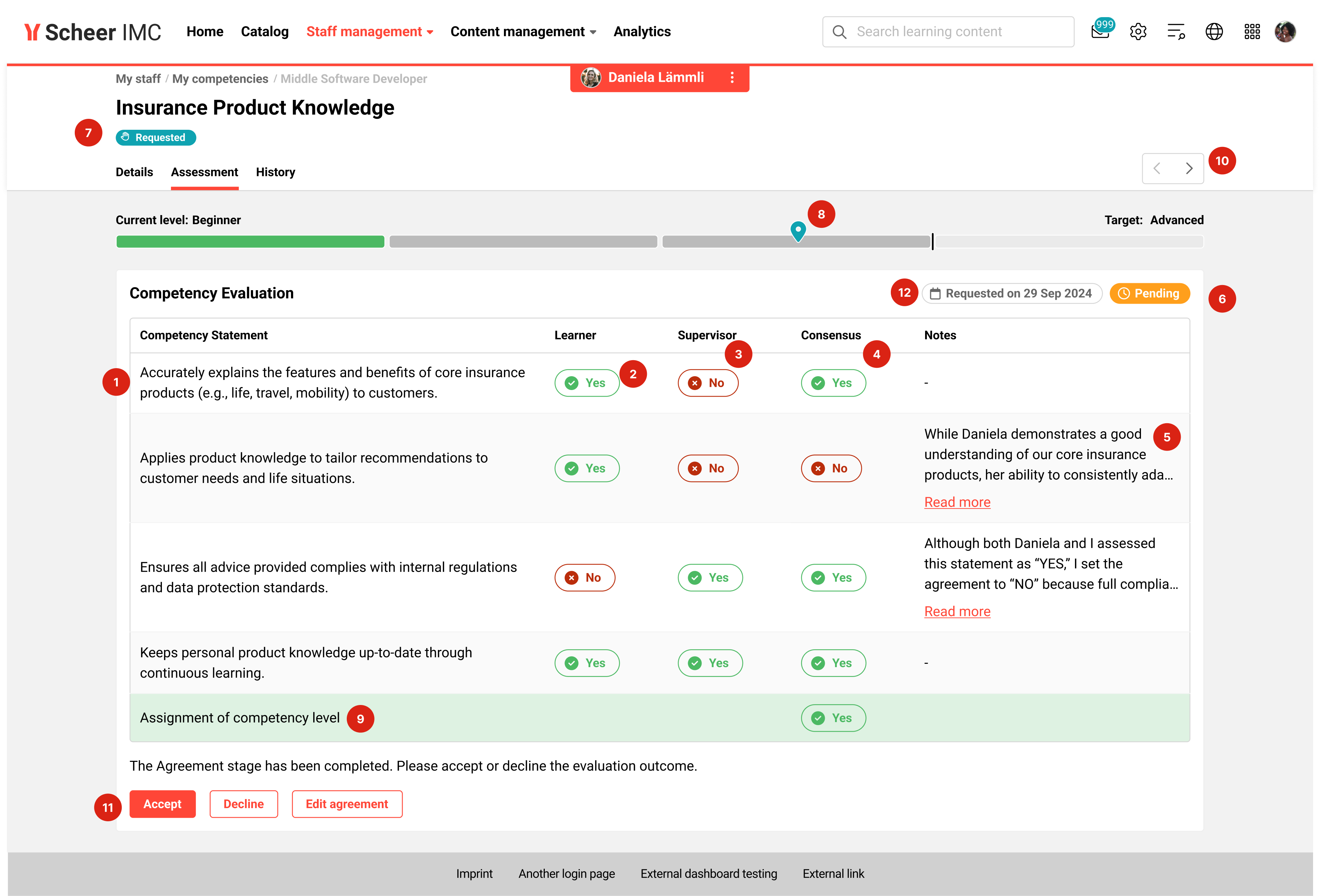
The confirmation by competency evaluation view includes the following UI components:
-
Competency Statements: a list of Competency Statements created in the skill scale tab, per skill.
-
Learner Self‑Evaluation: Yes/No per competency statement evaluation (learner-only access)
-
Supervisor Self‑Evaluation: Yes/No per statement (supervisor-only access)
-
Consensus-Building: Yes/No selection per statement (supervisor-only; enabled by default). Selection affects the outcome if the competency level is assigned as yes or no.
-
Notes: optional supervisor comments; helpful for discrepancies and documentation
-
Status: current state of the competency evaluation process
-
Assessment Status: overall status for the assessment instance
-
Skill Level: Evaluated skill-level
-
Assignment Outcome: positive/negative based on “Yes” threshold (green/red), configured within the skill
-
Navigation: quick movement between the skills
-
Confirmation: Learner and Supervisor confirmation, final approval/decline of the skill-level assignment
-
Status Date: date when the assessment was requested or started
Hints & Tips
-
Write observable statements (avoid vague terms such as “has good communication skills”). Use specific behaviors (e.g., “Adapts communication style to audience in 1:1 and group settings”).
-
Use Notes to document the rationale when learner and supervisor evaluations differ. This helps with future development discussions.
A detailed explanation and process workflow is available here.